
VEHICLE SERVICE HISTORY BY VIN
Every car has a story.
Know yours.
Check available service records, recorded mileage and workshop entries by VIN.
Explore a sample report
Service history gives you more to work with.
START WITH YOUR CAR
Choose your brand.
Find the report for your vehicle.
View the coverage, price and delivery details before you order.
Audi
BMW
Land Rover
Lexus
Mazda
Mercedes-Benz
MINI
Porsche
SEAT
Škoda
VW
The records available vary by brand, vehicle and recorded workshop activity. See your chosen report for details.
MORE THAN A STAMP
Understand what
the records tell you.
Look at the documented history before you decide. A service report helps you ask better questions about a car's maintenance.
Take a closer lookService entries
Review the dated servicing and workshop activity recorded for the vehicle.
Recorded mileage
Compare the mileage entries held in the records, with their dates and units.
Vehicle details
Check the vehicle identification and available specification information.
Additional entries
See manufacturer actions or other data where they are included for the brand.
A SIMPLE NEXT STEP
From VIN to inbox.
Choose the right report and provide your VIN.
We take care of the records.

Choose your report
Select your brand and enter the vehicle's 17-character VIN on the product page.

Complete your order
Review the report details and total before making your secure payment.

Open your PDF
Receive the report by email within the delivery window shown for your chosen product.
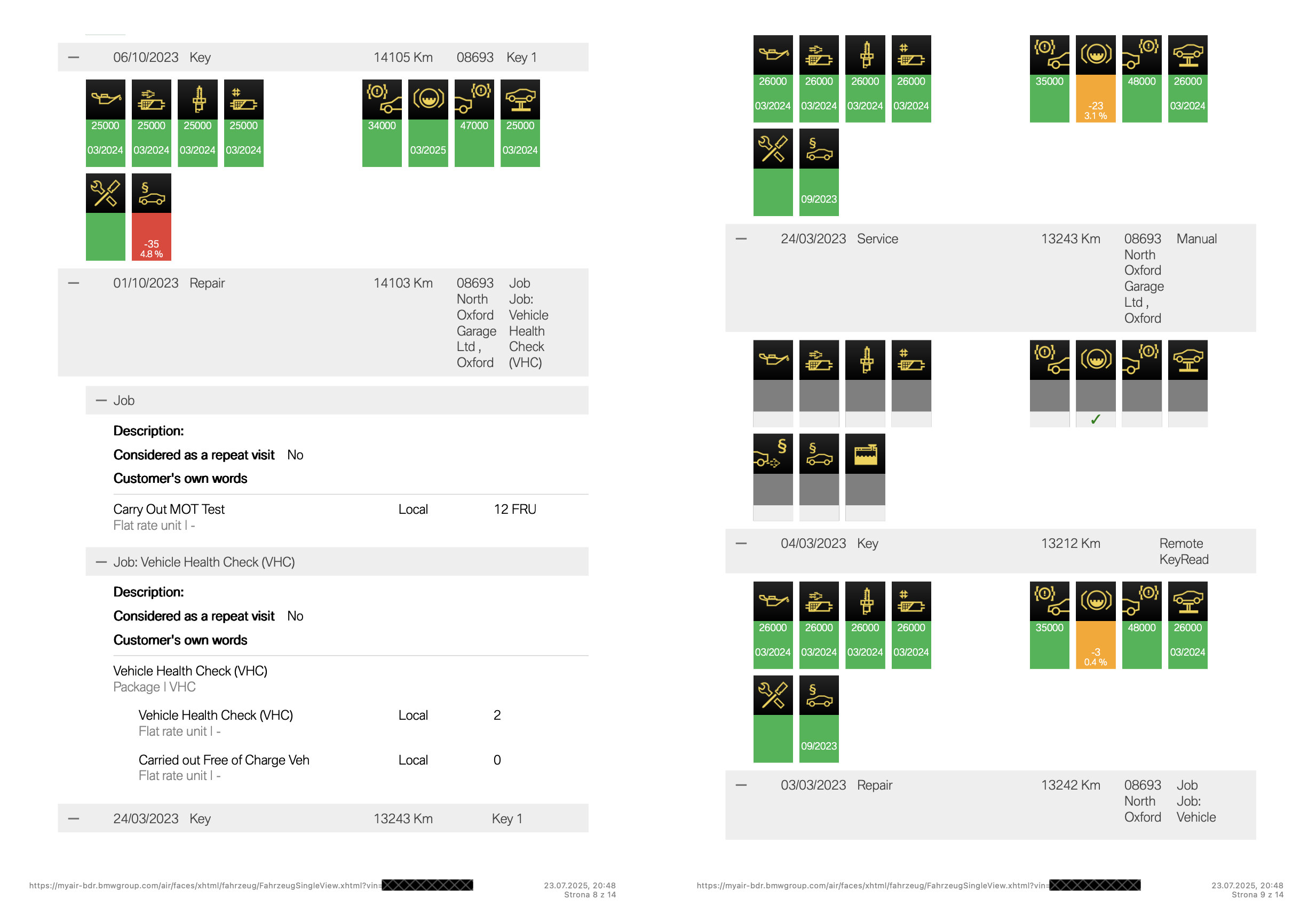
Genuine BMW report excerpt · image example · VIN obscured
SEE THE DETAIL
Know what you're
looking for.
A real report gives context to the service history. This BMW example shows the source layout, dated entries and mileage recorded at workshop visits.
- Dated workshop entries
- Recorded mileage and units
- Details of recorded work
This is a BMW sample. Layout and available information differ between brands and vehicles.
Open the full-size sampleA SPECIALIST SERVICE
Clarity comes first.
Focused on service history
Understand the maintenance records linked to a VIN, with coverage explained for each brand.
Yours to keep
A PDF delivered to your inbox, ready to read and refer back to as you review the vehicle.
Help from real people
Have a question about a report or your order? Contact the VinHistory team for support.
MAKE AN INFORMED CHOICE
A little knowledge.
A better decision.
BMW Service Records: What to Ask the Seller For
Before viewing a used BMW, ask the seller for documents that connect the particular vehicle to the maintenance being advertised. Start with the VIN, dated…
Read the guide ↗
Finding the VIN and Matching It to the V5C
Before comparing service documents, establish that they refer to the vehicle in front of you. Locate the VIN using the handbook and compare the identifier…
Read the guide ↗
Missing Service History: Recovering the Evidence
Recovering missing service history starts with identifying the absent evidence. Ask for a particular document or visit rather than promising that one database can restore…
Read the guide ↗What is a VIN-based service history check?
It checks the service information linked to a vehicle’s unique identification number. Choose your brand to see which records the report can include.
Where do I find the VIN?
The VIN is usually visible through the windscreen and appears on the V5C registration document. Use the full 17-character vehicle identification number when ordering.
Will every service appear?
The report reflects records held in the relevant source system. Work that was not recorded there may be missing. A gap in the data is not, on its own, proof that the car was not serviced.
How will I receive my report?
Your report is delivered by email as a PDF. Check the delivery information on the product page before ordering.
What happens if there are no records?
Read the availability and missing-history information on your chosen product and the terms before purchasing. Contact us if you need help with a particular vehicle.
THE NEXT CHAPTER STARTS HERE